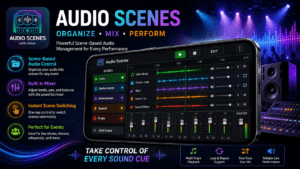
Audio Scenes – Scene-Based Live Audio Control for Events & Performances
Organize your event audio into named scenes, mix levels on the fly, and trigger tracks with a single tap. Built for sound engineers, performers, and event organizers who need zero-lag reliability when it counts.
Get it on Google PlayWhat Is Audio Scenes?
Audio Scenes is an Android app by in2words that transforms how sound professionals manage live event audio. Instead of hunting through file managers mid-performance, you pre-arrange every sound bite, loop, or track into logical Scenes — one per segment of your show — and fire them with a single tap when the moment arrives.
Whether you're running background music for a corporate gala, triggering sound effects for a theater production, or sequencing playback loops for a live band, Audio Scenes keeps your workflow clean and your hands free to focus on the performance itself.
Key Features of Audio Scenes
Scene-Based Organization
Group audio files into named scenes — one per act, segment, or moment. Switch between scenes instantly with a single tap, no file browsing needed.
Integrated Per-Scene Mixer
Each scene has its own built-in mixer. Balance and blend multiple tracks simultaneously, right from your Android device, during a live performance.
Seek Bar & Sync
A handy seek bar keeps you perfectly in sync. Always know exactly when the beat drops, the silence begins, or the next cue arrives.
One-Shot or Loop Playback
Play audio files as one-shot triggers or keep them looping as continuous beds. Ideal for ambient soundscapes, backing tracks, and effects loops.
Intuitive Reordering
Drag and rearrange tracks and scenes on the fly. The interface is designed for high-pressure live environments where every second counts.
Project Sharing & Duplication
Share your full project with co-engineers or duplicate it for future events. Quickly spin up variations without rebuilding scenes from scratch.
Who Should Use Audio Scenes?
Audio Scenes is purpose-built for anyone who manages audio playback in a live or semi-live setting:
Why Audio Scenes Stands Out
Most live playback tools are either too complex — burdened with DAW-level features you don't need on stage — or too basic, offering little more than a playlist. Audio Scenes fills the gap: professional enough for multi-track mixing, simple enough to operate under stage lighting with gloved hands.
The scene-based approach mirrors how experienced sound engineers already think about events — not as one long timeline, but as discrete segments, each with its own audio requirements. Defining those segments in advance means you're never scrambling through a file list when the MC calls your cue.
And because the app is designed for zero-lag performance, you get instant playback response the moment you tap — no buffering, no hesitation, no dropped cues.
Data Safety
Audio Scenes respects your privacy completely.
🔒 No data collected. The app does not collect any personal information from your device.
🤝 No data shared. Nothing is shared with third parties.
✅ As declared by the developer on the Google Play Store data safety section.
Frequently Asked Questions
What is the Audio Scenes app?
Audio Scenes is a free Android app by in2words that lets sound engineers and performers organize audio files into named scenes with an integrated mixer — purpose-built for live event management.
Can I mix multiple audio tracks at the same time?
Yes. Each scene includes a built-in mixer so you can balance and blend multiple tracks simultaneously during a performance without switching apps.
Can I share a project with my co-engineer?
Absolutely. You can export and share an entire project. The recipient needs the audio files available at the same paths on their device for playback to work correctly.
Does Audio Scenes support looped playback?
Yes. Any audio file within a scene can be set to loop continuously — perfect for background ambience, waiting music, or sustained sound beds.
Is Audio Scenes free?
Audio Scenes is free to download from the Google Play Store. The app is ad-supported.
Does the app collect any user data?
No. Audio Scenes does not collect or share any personal data, as declared by the developer in the Google Play data safety section.